Trying to scale local SEO across multiple locations by just repeating what works for one is a recipe for disaster. It gets messy, fast. A successful multi-location strategy isn't about scaling up single-location tactics; it's about building a centralized system designed for precision and storytelling at the local level.
The whole game plan rests on three core pillars:
- Creating unique, hyper-optimized location pages on your website that tell a local story.
- Meticulously managing individual Google Business Profiles for each branch.
- Maintaining iron-clad consistency with your Name, Address, and Phone number (NAP) everywhere online.
Get these right, and you create a powerful, repeatable architecture that lets each location—from a packed downtown office to a quiet suburban shop—connect with and compete effectively in its own backyard.
Building a Scalable Multi-Location SEO Foundation
Let's be real: managing SEO for just one business is a handful. When you're juggling a dozen or more, it can feel downright impossible without a solid blueprint. This is that blueprint. We're going to lay out a practical, actionable structure for a winning strategy, covering how to organize your website, manage your online profiles, and lock down your data so you can actually rank.
Think of it as a three-part process that flows together. Your website is the hub where you tell your stories, your online profiles are the spokes that reach into the community, and clean data is the grease that keeps the whole wheel turning smoothly.
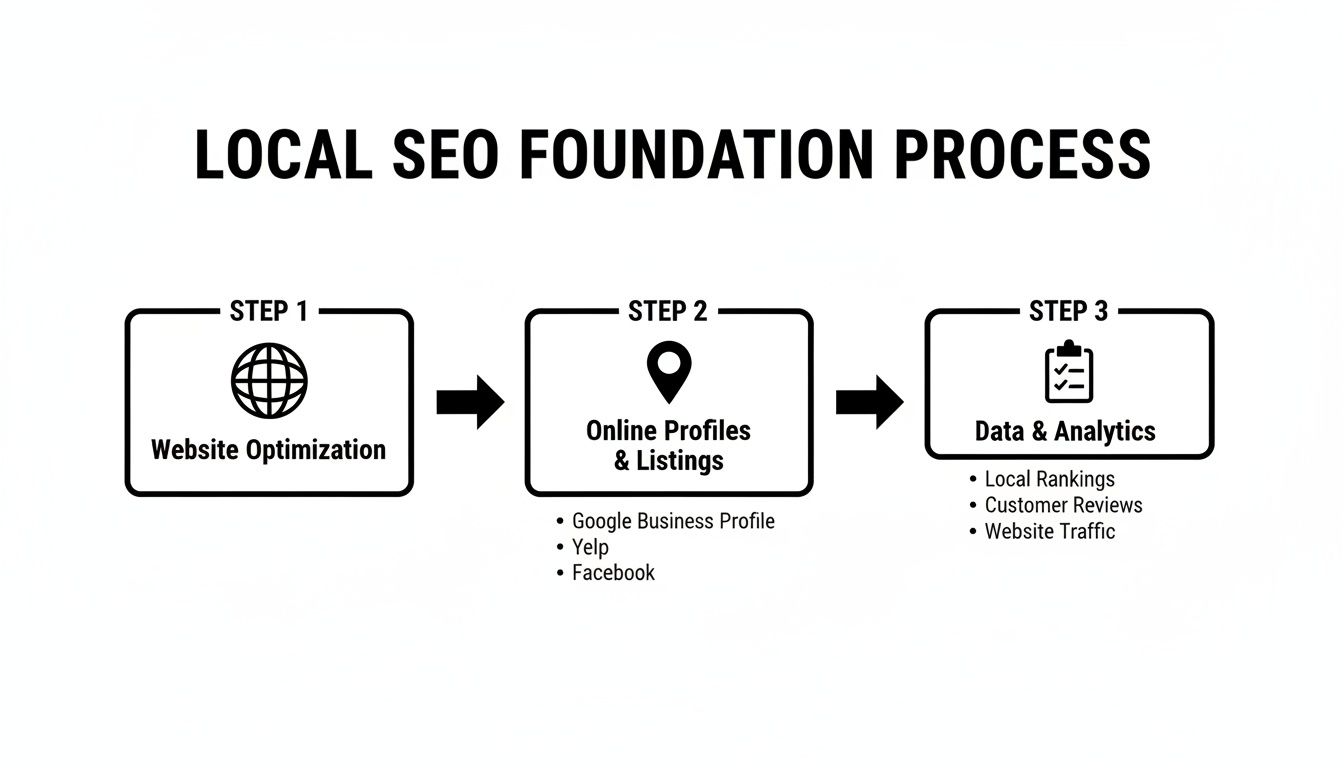
The key takeaway here is that these pieces are all interconnected. A well-built website makes your profiles stronger, and those profiles need accurate data to build trust with Google and customers.
Before diving into the nitty-gritty, let's look at the foundational components of a successful strategy. This table breaks down the essential pillars you'll need to build a system that supports growth across all your branches, ensuring no location gets left behind.
Core Pillars of Your Multi-Location Strategy
| Component | Objective | Key Action |
|---|---|---|
| Website Architecture | Establish each location as a distinct, relevant entity for local search. | Create unique, content-rich location pages for every branch. |
| Google Business Profile | Maximize visibility in local map packs and search for each specific area. | Individually optimize and manage a GBP for every physical location. |
| Data & NAP Consistency | Build trust with search engines and avoid confusing customers. | Establish a single source of truth for all location data and ensure it's identical everywhere. |
| Reviews & Reputation | Leverage social proof to attract local customers and improve rankings. | Implement a system to generate and respond to reviews for each location. |
With this framework in mind, you can start building a robust local presence that not only scales but thrives.
Architecting Your Website for Local Dominance
Your website is the heart of your entire local strategy. Simply slapping a list of addresses on a generic "Contact Us" page is a huge miss. To win, each of your locations needs to be treated as its own distinct entity with its own dedicated space online. That means creating unique, fully optimized location pages.
Think of each location page as a mini-homepage built specifically for that community. It's where you don't just list information; you tell that neighborhood's story. It absolutely must include:
- The complete Name, Address, and Phone number (NAP).
- Unique business hours for that specific store.
- An embedded Google Map for one-click directions.
- Real photos of the local storefront, interior, and team.
- Testimonials and reviews from actual local customers.
This approach sends a crystal-clear signal to Google: your business is physically present and deeply relevant to searchers in that specific area.
A common hang-up here is the fear of creating duplicate content. But the intent of each page is different because it serves a different geographic audience. For a deeper dive, our article explores whether repeated information on a website is bad for SEO.
The goal is not just to list your locations; it's to prove your local relevance. A real story from a local customer or a photo from a community event on a location page builds more trust than a generic stock photo ever could.
Establishing Flawless Data Consistency
Inconsistent information is the silent killer of local SEO campaigns. I've seen it sink otherwise solid strategies. A single typo in a street name or an old phone number lingering on a third-party directory creates confusion for both Google and your potential customers. This is why strict NAP consistency is completely non-negotiable.
For businesses with multiple locations, Google evaluates each one on its own merits—proximity, relevance, and prominence. A branch in one neighborhood can be invisible to searchers just a few miles away if its data isn't perfectly buttoned up across the web.
Your NAP data must be 100% identical everywhere it appears online. I'm talking about your website, your Google Business Profile, and directories like Yelp or Apple Maps. Even a small difference like "St." versus "Street" or "Suite 100" versus "#100" is enough to erode Google's trust. The only real solution is to create a single source of truth—a master spreadsheet with the exact, official NAP for every location—and use it religiously for all online submissions.
Mastering Google Business Profile at Scale
Once your website is structured for local success, the next battleground is Google itself. For each of your locations, you can think of its Google Business Profile (GBP) as the digital front door. When you're running multiple storefronts, keeping all those doors consistent, optimized, and welcoming is a massive operational lift—but it's also where you can carve out a serious competitive edge.
Managing these profiles isn't just about data entry. It's about telling a unique local story for each branch while keeping the brand's identity tight. This is where your multi-location local SEO strategy really comes alive, turning a simple map pin into a customer-generating machine.
Streamlining Management with a Business Group
The very first practical step away from chaos is to create a Business Group (what Google used to call a location group) inside your GBP dashboard. This one move pulls all your individual location listings into a single, manageable portfolio. No more logging in and out of different accounts or trying to sort through a messy, disorganized list. You get one centralized command center.
Honestly, this is non-negotiable for any business with more than a handful of locations. It’s the foundation for everything you’ll do at scale, from bulk updates to performance analysis.
The Power of Bulk Updates
Picture this: it’s the week before a major holiday. You have 50 stores, and you need to update the hours for every single one. Trying to do this manually is not just a drag; it’s a recipe for costly mistakes that lead to angry customers showing up at a locked door.
This is exactly where bulk updates become a lifesaver. With a Business Group, you can download a spreadsheet of all your locations, tweak hours, services, or attributes, and upload it in minutes. I've seen a retail chain do this, rolling out holiday hours to all their stores in less than an hour. They completely sidestepped their usual customer service nightmare and even saw a jump in positive reviews praising their clear communication.
A classic mistake is treating Google Business Profile as a "set it and forget it" tool. It’s not. It’s a dynamic profile. Consistently using features like Posts, Q&A, and photos sends strong signals to Google that your business is active and engaged, which directly boosts your local rankings.
Empowering Local Managers Without Losing Control
While central control is great for efficiency, local expertise is priceless. Your store manager in Austin knows that city better than anyone at corporate. They know about the local festival happening down the street or that a nearby road is closed for construction—details that matter to local customers.
You can grant different levels of access to your local teams:
- Owner: Has the keys to the kingdom with full control.
- Manager: Can edit most business info and respond to reviews.
- Site Manager: Has limited access, perfect for responding to reviews and uploading photos.
By making a local manager a "Site Manager" on their specific GBP, you empower them to upload authentic photos from a community event or answer a location-specific question in the Q&A. This builds a vibrant, genuinely local profile that clicks with the community. Meanwhile, the central marketing team keeps a lock on core brand information like the business name and primary category. It’s the perfect blend of scale and local flavor.
Tell a Hyper-Local Story for Each Community
Generic, one-size-fits-all content is the quickest way to kill your local SEO. While your brand’s core message needs to stay consistent, the real connection—the kind that drives foot traffic—happens at the community level.
You can't just tell customers you're in their neighborhood; you have to prove it. That means weaving your brand directly into the fabric of the community. Your goal should be to transform each location page from a simple business listing into a genuine, valuable local resource.
Go Way Beyond Basic Location Details
Every location page has to nail the essentials: correct Name, Address, and Phone number (NAP), hours, and an embedded map. But that’s table stakes. To actually stand out and rank, these pages need a unique, local flavor that a corporate template just can't deliver.
Think about a multi-location dental group. Instead of plastering the same bland text on every page, the Austin branch could publish a blog post with photos from a local health fair they sponsored at Zilker Park. The Dallas location might feature a Q&A with a hygienist who’s a die-hard Dallas Cowboys fan.
This is the kind of authentic, relevant content a national competitor can't possibly replicate. These small, localized stories do two critical things:
- They feed Google fresh, unique content, signaling that you're a legitimate local entity.
- They build a real emotional connection with the community, showing you're more than just another faceless chain.
Weave Community Engagement into Your Content
Real-world community involvement is an absolute goldmine for local content. It's the most authentic way to show you're invested in the area. Start thinking about how your business already engages with each community and turn those actions into content.
For example, a restaurant chain with multiple locations could write a blog post about sponsoring a local little league team in one town. The post would feature pictures of the team, a quote from the coach, and maybe a special offer for the players' families. That kind of content is incredibly shareable within that specific community and creates powerful local signals for Google.
People support businesses that support their community. When you share stories about your local involvement, you're not just doing SEO; you're building brand loyalty that translates directly into foot traffic and sales.
Authenticity is everything here. This isn't about grand, one-off gestures but consistent, genuine participation. Even something as simple as featuring an "employee of the month" with a short bio about why they love living in their city adds a human touch. If you need more ideas on how to connect with your local audience, check out this comprehensive guide to SEO localization.
Use Local Schema to Tell Google the Full Story
Once you've created all this rich, local content, you need to make sure search engines can actually understand it. This is where Local Business schema becomes your secret weapon. Schema is just a type of structured data—code, basically—that gives search engines crystal-clear information about your business.
For each location page, you can implement schema to spell out details like:
- Precise Geocoordinates: The exact latitude and longitude of your front door.
- Department Information: Think a service center within a car dealership or a pharmacy inside a grocery store.
- Local Events: Highlighting a workshop or community event you're hosting at that specific branch.
By marking up your content with this data, you're essentially spoon-feeding Google the exact details it needs to feature your business prominently in local results. It’s the technical step that validates all your content efforts, ensuring your local stories get the visibility they deserve.
Building Your Local Reputation and Review Engine
For a multi-location brand, your reputation isn't built in a boardroom at corporate headquarters. It's forged one customer, one handshake, and one review at a time, right there in the communities you serve. Reviews have become the currency of local trust. They're powerful social proof that directly sways both customer decisions and your search rankings.
Putting a system in place to generate and manage this feedback at scale is a non-negotiable part of any serious local SEO for multiple locations strategy. This isn't just about chasing five-star ratings. It's about building a powerful feedback engine that boosts your visibility and hands you priceless operational insights, one location at a time.
The Power of Localized Social Proof
Potential customers aren't just glancing at your brand's overall rating; they're digging into the feedback for the specific location they actually plan to visit. A recent survey found that a staggering 91% of consumers look at reviews for individual branches when forming an opinion about the larger brand.
This means the reputation of your entire company can hang on the performance of a single storefront. On top of that, 75% of consumers say they "always" or "regularly" read online reviews when checking out local businesses, making it a pivotal part of their buying journey. You can see more on how reviews shape customer behavior and rankings in this in-depth local consumer review survey.
The data tells a simple story: you can't lean on a strong corporate brand to prop up underperforming locations. Each branch has to build its own foundation of trust within its neighborhood.
Creating a Scalable Review Generation System
Asking for reviews can't be a "maybe later" task. It needs to be baked right into your daily operations. The secret is making it incredibly easy for both your team and your customers.
- Empower Your Local Managers: Your people on the ground are your biggest asset. Train them on the right (and wrong) times to ask for a review. The best moment is usually right after a great customer experience, like a successful service call or a happy in-store purchase.
- Keep the Tech Simple: Don't force customers to jump through a bunch of hoops. Use tools that can fire off a simple review request via SMS or email with a direct link to that location's Google Business Profile. Removing that friction is the key to boosting response rates.
- Look Beyond Google: While Google is the undisputed king for local SEO, encouraging reviews on industry-specific sites (think TripAdvisor for hotels or Avvo for law firms) helps build a more well-rounded and believable online reputation.
I worked with a national home service franchise that was getting hammered with negative feedback at a few key locations. We rolled out a simple SMS-based review request that was automatically sent after every completed job. Not only did they drown out the negative comments with a flood of positive ones, but they also spotted a recurring scheduling problem at one specific branch. That negative feedback turned into an invaluable operational insight. Once fixed, customer satisfaction shot up, and so did that branch's local rankings.
Centralizing Your Review Management
As reviews start pouring in across dozens or even hundreds of locations, trying to manage them manually is a recipe for disaster. This is where reputation management software becomes a lifesaver. These platforms pull all your reviews from sites like Google, Yelp, and Facebook into a single, unified dashboard.
This bird's-eye view allows your corporate or marketing team to:
- Monitor Feedback in Real-Time: Get instant alerts for new reviews. This allows for quick responses to both glowing praise and harsh criticism. A fast reply shows you're listening and can often turn a negative experience around.
- Maintain Brand Voice Consistency: You can create response templates that local managers can then customize. This ensures every reply is on-brand, but still feels personal and genuine.
- Spot Trends and Identify Issues: Are customers in different cities all complaining about the same thing? A centralized dashboard makes it easy to connect the dots on systemic problems that might otherwise fly under the radar.
By building out this review engine, you kickstart a virtuous cycle. More positive reviews lead to better local rankings. Better rankings drive more customers. And more customers leave more reviews. It’s a powerful growth loop that solidifies your brand's presence in every neighborhood you serve.
How to Measure Your Local SEO Performance
If you're not measuring your marketing, you're not improving it. That old saying is especially true for the tangled world of multi-location local SEO, where success isn’t about a single ranking but about winning across dozens of neighborhoods at once. It's time to get past vanity metrics and zero in on the numbers that prove your strategy is actually working.
You need a crystal-clear picture of what’s driving foot traffic, phone calls, and real revenue for each and every one of your locations.
Key Metrics for Multi-Location Businesses
To get a real feel for your local performance, you have to track metrics that bridge the gap between online visibility and real-world actions. This is all about measuring intent and conversion, not just website hits.
Here are the core numbers that absolutely must be on your dashboard:
- Local Organic Traffic: Dig into Google Analytics and segment traffic going to each specific location page. A steady climb here is a great sign that your content and on-page SEO are hitting the mark locally.
- Google Business Profile Actions: Keep a close eye on clicks for directions, phone calls, and website visits coming directly from your GBP listings. These aren't just clicks; they're high-intent actions from people ready to connect.
- Local Keyword Rankings: Track where you stand for geo-targeted keywords (think "plumber in Austin") for every single location. You'll need a rank tracker that can filter by zip code or city to get data that's actually accurate.
- Map Pack Visibility: Measure how often each of your locations pops up in the Google Maps "local pack." This is the beachfront property of local search, and you want to own it.
The commercial intent behind these searches is off the charts. It's projected that by 2025, a staggering 76% of mobile users who search for something "near me" will visit a physical store within 24 hours. On top of that, around 42% of local searchers click on results right inside the Google Maps pack, which just goes to show how critical it is for multi-location brands. You can dig into more stats on how local searches translate into sales on wiserreview.com.
Setting Up Your Tracking Infrastructure
Knowing what to track is only half the battle. You need the right setup to capture that data accurately across all your branches. A little bit of technical groundwork here will pay off in a huge way down the road.
UTM parameters are the perfect place to start. These are just simple tags you add to the end of your URLs—especially the website link in your Google Business Profile. By creating a unique UTM for each location, you can tell Google Analytics exactly which GBP listing sent a visitor to your website.
For instance, the link for your Dallas location’s GBP might look something like this:yourwebsite.com/locations/dallas?utm_source=google&utm_medium=organic&utm_campaign=gmb-dallas
This simple tweak allows you to build custom reports in Google Analytics showing you precisely how many website visits, conversions, and even revenue each individual profile is generating. For proving ROI, it's an absolute game-changer. We dive deeper into this concept in our guide on how analytics and paid search work together.
Your goal is to connect every online action to a specific location. Without that connection, you're flying blind, unable to spot which branches are excelling and which ones need more support.
Building Your Local SEO Dashboard
Once your tracking is solid, it's time to pull all that data into a centralized dashboard. A tool like Google Looker Studio is perfect for this, giving you a single, at-a-glance view of your entire multi-location performance.
Your dashboard should let you filter by location and see key trends over time. Imagine being able to see that your Miami branch saw a 30% spike in direction requests right after you updated its photos, while your Chicago location’s keyword rankings took a dip.
This is the kind of insight that lets you make smart, data-driven decisions—funneling more budget into what’s working and fixing what isn't. This is how you stop guessing and start knowing, turning raw data into a clear roadmap for growth.
Common Multi-Location SEO Questions Answered
When you're trying to nail local SEO for multiple locations, some tricky questions always seem to pop up. Even with a solid game plan, you'll run into unique challenges that can stump even the most experienced marketers.
Let's clear the air. In this section, we're tackling the most common and pressing questions that come up when you’re trying to scale your local search footprint, complete with clear, no-fluff answers.
Can I Have More Than One Google Business Profile
Yes, you absolutely can—and you should. The golden rule here is simple: one Google Business Profile (GBP) per physical location where you serve customers face-to-face. Got ten storefronts? You need ten verified GBP listings.
Trying to stuff multiple addresses into a single profile is a fast track to getting your listing suspended, as it's a direct violation of Google's guidelines. Think of each profile as a unique digital front door for its specific community, giving you the chance to show up in local map packs for that area.
But here’s the catch: this only works for locations with a physical address customers can actually visit. You can't just spin up a GBP for a city you serve but don't have an office in. For those "service areas," your on-site location pages are what you need to focus on.
How Should I Structure URLs for New Locations
Keep it clean and logical. A straightforward URL structure is a huge help for both users and search engines trying to understand your site's hierarchy. The most common—and effective—approach is a simple subfolder structure:
yourwebsite.com/locations/city-name
If you have a few branches in the same city, you can take it a step further:
yourwebsite.com/locations/city-name/neighborhood-or-street
This structure instantly signals that each page represents a distinct geographical spot. For example, a coffee shop in Los Angeles could use /locations/los-angeles-silverlake. It’s descriptive, easy for customers to read, and great for SEO. Whatever you do, steer clear of long, messy URLs filled with random numbers or codes. They add zero value.
Is It Okay to Use Similar Content on Different Location Pages
This is a big one, and the answer is yes, but with a critical caveat. It’s perfectly fine to use a consistent template for your location pages, but to actually be effective, each page must be localized.
Google gets it. The intent behind your Dallas location page is different from your Houston page because they serve completely different audiences. You won't get hit with a duplicate content penalty just for having the same service descriptions.
But to truly rank well, you have to inject some unique, local flavor.
- Photos: Show off pictures of the actual local team and the storefront.
- Testimonials: Feature reviews from customers who live in that specific city.
- Local Landmarks: Mention nearby points of interest to anchor the page geographically.
- Community Involvement: Talk about local events you sponsor or teams you support.
The core information about what you do can stay the same, but the story you tell has to be local. A generic, copy-pasted page where you just swap out the city name will never compete with a page that feels genuinely connected to its community.
How Do I Handle "Near Me" Searches
Here's the secret: you don't actually optimize for the phrase "near me." Instead, you focus on perfecting all your local signals, and Google does the heavy lifting. The algorithm is more than smart enough to connect the dots based on a user's physical location.
When someone searches "pizza near me," Google uses their device's location to find the most relevant and closest pizza joints. Your job is to make sure that when a searcher is standing near one of your locations, you've given Google every possible reason to show them your business.
That means having:
- A fully optimized and active Google Business Profile.
- A content-rich, genuinely localized page on your website.
- Consistent NAP (Name, Address, Phone) information across the web.
- A steady stream of positive local reviews.
If you nail these fundamentals, you'll automatically be in the running for those high-value "near me" searches without ever having to awkwardly stuff the phrase into your content. Your real goal is to prove your relevance to a specific geographic area.
Ready to stop guessing and start winning in every neighborhood you serve? At Jackson Digital, we build data-driven local SEO strategies that turn visibility into measurable growth for multi-location businesses. Request your free performance audit today and discover how we can help you dominate local search. Find out more at https://jackson-digital.com.