An effective digital marketing audit is the blueprint for real business growth. It's what separates vague spending from clear, measurable results.
Instead of just throwing money at different channels and hoping for the best, a proper audit forces you to methodically analyze everything—from your SEO to your paid ads—to pinpoint exactly what's working, what's failing, and where your biggest opportunities are hiding.
Why a Digital Marketing Audit Is Your Growth Blueprint

Let’s be honest, it’s frustrating to watch your marketing budget disappear without a clear return. Too many businesses treat marketing as a necessary expense, blindly hoping that more spending will magically lead to more customers. This guide is all about flipping that mindset. We're treating the audit not as some tedious chore, but as a strategic tool for growth.
Think about a local dentist spending thousands on ads, yet the phone isn't ringing any more than usual. This is a story I’ve seen play out time and time again. An audit revealed they were telling the wrong story to the wrong audience—targeting broad, expensive keywords instead of local search terms that actually convert, like 'emergency dentist near me.'
By reallocating their budget based on what we found, they managed to cut their ad spend by 30% while simultaneously increasing qualified patient inquiries. That's what an effective audit does: it kills the guesswork and hands you a data-driven path to turn your marketing spend into tangible results.
Turning Data Into Direction
The whole point is to shift from "I think this is working" to "I know this is working." A comprehensive review connects the dots between your actions and your outcomes. You might discover, for example, that the story you told in a single blog post a year ago is still bringing in your highest-value customers. That's a powerful insight you can act on immediately.
An audit isn't about finding fault; it's about finding clarity. It systematically uncovers hidden opportunities and plugs the leaks in your budget, ensuring every dollar you spend is pushing your business forward.
This process is absolutely critical today. The digital marketing world is massive and incredibly competitive. Just look at the numbers: digital ad spend alone hit a staggering $601.8 billion in 2023, making up two-thirds of all media spending. For a small business, that means you have to be surgical with your portion of that spend.
From Insights To Actionable Steps
A proper audit delivers more than just a report card—it gives you a prioritized to-do list. To make sure you're covering all your bases, this ultimate website auditing checklist breaks down 10 key areas for optimizing your online presence. It's a great starting point. If you want to dig a bit deeper first, you can learn more about what a marketing audit is and why it's crucial for your strategy.
Ultimately, this entire process empowers you with the knowledge to make much smarter decisions. You'll be able to:
- Allocate your budget effectively: Stop wasting money on channels that don’t deliver and double down on what does.
- Understand your customers better: Discover which stories and platforms truly resonate with your target audience.
- Outmaneuver the competition: Identify gaps in their strategy that you can exploit for your own gain.
By the end of this guide, you'll have a step-by-step framework to conduct your own audit and build a plan that truly scales your business.
Auditing Your Search Engine and Local Visibility

Ranking on search engines isn’t just about stuffing keywords onto a page anymore. It’s about telling the most helpful and authoritative story wherever potential customers are looking.
This part of your audit digs into your Search Engine Optimization (SEO), your local visibility (GEO), and even how you show up in voice searches (AEO). We're moving beyond theory to give you a hands-on approach so you can understand how search engines see your website and, more importantly, how real people find you when they need what you offer.
Kicking Off Your SEO Health Check
Your website's technical health is the foundation of its visibility. If search engines can't properly crawl and understand your site, even the most compelling brand story will go completely unheard.
A great place to start is with free tools. Use Google's own PageSpeed Insights to test how quickly your pages load. A slow site is a huge turn-off for both users and search engines. A mobile score below 50 is a serious red flag that needs immediate attention.
Another critical area is your on-page structure. Take a hard look at the title tags and meta descriptions for your most important pages.
- Are your title tags clear and compelling? They should accurately describe the page's content and include your main keyword without sounding robotic. This is your story's headline in the search results.
- Do your meta descriptions act like a mini-advertisement? Their entire job is to entice someone to click, offering a compelling preview of the value inside.
- Are your headings (H1, H2, H3) structured logically? This simple hierarchy helps both users and search engines follow the narrative of your content at a glance.
The "Traffic acquisition" report in Google Analytics, shown above, is your command center for this. By analyzing this data, you can quickly see if your organic search traffic is growing or declining, pointing you toward which SEO efforts are actually paying off.
Auditing Your Local Presence for Foot Traffic
For any business with a physical location, local SEO (GEO) is non-negotiable. Your Google Business Profile (GBP) is often the very first chapter of your story that a local customer reads. An audit here can reveal massive opportunities.
I once worked with a multi-location retailer whose local listings were telling different, confusing stories. Different stores had inconsistent names, old phone numbers, and holiday hours that were never updated. After a thorough audit and standardization of every single listing, they saw a 40% increase in visibility for "near me" searches, which directly boosted foot traffic to their stores.
An incomplete or inaccurate Google Business Profile isn't just a missed opportunity; it's actively sending potential customers to your competitors. Your audit must treat this profile with the same seriousness as your website's homepage.
Use this checklist to audit your own GBP:
- Name, Address, Phone (NAP): Is this information 100% consistent across your profile, your website, and other online directories? Consistency builds trust with search engines.
- Business Hours: Are your regular and holiday hours always accurate? Outdated hours are one of the fastest ways to frustrate a potential customer.
- Reviews: Are you actively responding to both positive and negative reviews? This public conversation shows you care and builds serious trust.
- Q&A Section: Have you pre-populated this with common questions and provided clear, helpful answers? If you don't control the narrative, someone else will.
- Photos: Are your photos high-quality, current, and showcasing your services, products, and team? Tell a visual story that stock photos can't.
Looking Beyond Traditional Search
Answer Engine Optimization (AEO) is about optimizing your content to be the definitive answer. It’s how you show up in voice search results and those coveted "featured snippets" at the top of Google. The goal here is to provide direct, concise answers to the questions your audience is asking.
During your audit, analyze your existing blog posts and FAQ pages. Are they written in a conversational, question-and-answer format? Tools like AlsoAsked.com can show you the exact questions people are searching for related to your services.
Structuring your content to directly answer these queries is key to capturing this growing source of traffic. In fact, successfully navigating local SEO for multiple locations often means mastering this type of specific, answer-focused content for each market you serve.
Analyzing Your Paid Advertising Performance

Pouring money into paid advertising without a clear view of its performance is like driving blindfolded. When you audit digital marketing campaigns, paid media is often where you find the fastest and most significant financial wins. This isn't about chasing vanity metrics like impressions or clicks; it's about connecting your ad spend directly to profit.
We need to look past the surface and focus on the numbers that actually matter to your bottom line: Return on Ad Spend (ROAS) and Cost Per Acquisition (CPA). These two metrics tell the real story of whether your campaigns on platforms like Google Ads and Meta are a smart investment or just a sunk cost.
Pinpointing Budget Drains in Your Campaigns
Common budget drains are surprisingly easy to spot once you know where to look. One of the most frequent issues is a fundamental mismatch between your ad creative, the audience you're targeting, and the offer on your landing page. If your ad promises a "50% Off Sale" but the landing page just shows your full-priced new arrivals, you're paying for clicks that will almost certainly bounce.
Another major culprit? Bidding on overly broad keywords in your Google Ads campaigns. A term like "shoes" might get you a lot of clicks, but it attracts a wide, unqualified audience. In contrast, a long-tail keyword like "women's waterproof hiking boots size 8" attracts a buyer with clear intent, leading to a much higher conversion rate.
Your ad account is filled with data-driven stories. The story of an e-commerce store that doubled its ROAS in a month is a powerful example. Their audit revealed they were spending heavily on a demographic that clicked frequently but almost never purchased. A simple targeting pivot changed everything.
Digging Into the Right Reports
To find these insights yourself, you don't need to be a data scientist. You just need to know which reports hold the answers.
- In Google Ads: Start with the "Search terms" report. This shows you the actual queries people typed before clicking your ad—not just the keywords you bid on. If you see irrelevant terms, add them to your negative keywords list immediately to stop wasting money.
- In Meta Ads Manager: Dive into the "Breakdown" feature. Here, you can segment performance by age, gender, placement (e.g., Instagram Stories vs. Facebook Feed), and device. This is how you'll discover if a specific audience segment or placement is burning through your budget.
This kind of analysis isn't a one-time fix. For a more structured approach, a guide to improving Google Ads performance can offer a disciplined framework for auditing your accounts effectively.
Connecting Ad Performance to Business Goals
Ultimately, the goal of a paid ads audit is to ensure every dollar is aligned with your business objectives. It's not just about lowering your CPA; it's about acquiring the right customers—those with the highest lifetime value.
Consider the e-commerce store we touched on earlier, the one selling high-end outdoor gear. Their initial Meta ads told a generic "outdoor enthusiast" story to a broad 18-65 audience. The audit, however, showed that their most profitable customers were consistently in the 35-55 age bracket with specific interests in hiking and camping.
By narrowing their targeting and tailoring their ad creative to this core demographic, they not only stopped wasting money on low-converting clicks but also increased their average order value. Their ROAS doubled in just 30 days. This is the tangible power of a paid media audit. If you want a more in-depth look at this, exploring different paid search analytics strategies can provide even more clarity.
Getting a Grip on Your Website Analytics and User Journey
Your website analytics platform—think Google Analytics 4 (GA4)—is way more than just a dashboard full of charts and numbers. It's the story of every single person who interacts with your brand online. But let's be honest, it's incredibly easy to get lost in the weeds.
A real analytics audit isn't about tracking every metric under the sun. It's about asking the right business questions first, and then knowing exactly where in the data to find the answers. The goal is to piece together the entire user experience, from the first click that brought them to your site to the final action that turned them into a customer. This is how you find your best traffic sources, pinpoint the pages that are bleeding visitors, and map out the exact paths your best customers take.
Mapping the User Journey From Start to Finish
Think of a 'user journey audit' as playing detective. You're tracing the exact steps a potential customer takes on your site. For an e-commerce brand, it might look straightforward: a user clicks a Facebook ad, lands on a product page, adds an item to their cart, and checks out. Simple, right?
But what about all the little steps in between? Did they poke around the "About Us" page to see if you're legit? Did they hunt down your shipping policy before committing? Understanding these micro-steps is where the gold is.
I once worked with a SaaS company that had tons of traffic hitting their pricing page, but demo sign-ups were bizarrely low. By mapping the user journey, we spotted a massive drop-off right after the pricing page. It turned out the price wasn't the issue at all—it was the clunky, confusing form that came next. It was a beast, asking for way too much information upfront.
We slashed the form down to just three essential fields and moved the rest of the questions into the post-signup follow-up. That one simple fix, which came directly from a user journey audit, gave them a 25% lift in demo sign-ups. No extra ad spend, just a smarter flow.
Identifying Your Most Profitable Channels
Here’s a hard truth: not all traffic is created equal. A huge part of your audit is figuring out which channels aren't just sending you visitors, but are actually bringing in paying customers. In GA4, your command center for this is the "Traffic acquisition" report.
This report lets you slice and dice your traffic by source and medium. You might find out that while social media brings in a flood of visitors, your humble email newsletter has a conversion rate that's 5x higher. That's a game-changing insight. It tells you exactly where to double down with your time and money.
- Organic Search: Are visitors finding you through specific keywords that convert exceptionally well? Use this to refine your SEO and content strategy.
- Paid Search: Which campaigns or ad groups are giving you the highest Return on Ad Spend (ROAS)? Kill the losers, feed the winners.
- Referral Traffic: Are there a few key blogs or partner sites sending you highly qualified leads? Maybe it's time to build a stronger relationship there.
This focus on profitability is where so many marketing teams drop the ball. A staggering 83% of marketers say that proving ROI is their biggest challenge. Yet, we know that data-driven companies are 6% more profitable than their competitors. This is why your audit must obsess over measurement. As you can see from these digital marketing KPI insights, a good audit is the first step toward measurable business growth.
Finding and Fixing Friction Points
Friction points are the silent conversion killers on your website. They're the hidden roadblocks that frustrate users and send them packing—think slow-loading pages, broken links, confusing navigation, or a checkout process that feels like doing your taxes.
Your analytics can act like a treasure map, leading you straight to these problem areas. The "Pages and screens" report in GA4 is perfect for this. Hunt for pages with abnormally high exit rates. If a key service page has an 80% exit rate, that’s a five-alarm fire. Something on that page is actively pushing people away.
Once you’ve identified a leaky page, you can start investigating.
- Is the Call-to-Action (CTA) clear? Maybe that "Buy Now" button is hiding below the fold.
- Is the page a nightmare on mobile? Don't guess. Use Google's Mobile-Friendly Test to know for sure.
- Does the content match the user's intent? A page titled "Affordable Pricing" shouldn't be loaded with dense, technical jargon.
By systematically finding and fixing these friction points, you're paving a smoother, more intuitive path for your users. That almost always leads to higher conversion rates and a healthier bottom line.
A successful audit hinges on tracking the right numbers—the ones that actually connect marketing efforts to business results. Don't get distracted by vanity metrics.
Key Metrics for Your Digital Marketing Audit
Focus on these key performance indicators (KPIs) across different channels to measure what truly impacts business growth during your audit.
| Channel | Primary KPI | Why It Matters |
|---|---|---|
| SEO | Organic Conversion Rate | Shows if your SEO efforts are attracting visitors who take valuable actions, not just traffic. |
| Paid Media | Return on Ad Spend (ROAS) | Directly measures the revenue generated for every dollar spent on advertising. |
| Content Marketing | Leads Generated | Connects content consumption directly to the sales pipeline. A blog post is a success if it creates a lead. |
| Email Marketing | Click-to-Open Rate (CTOR) | Measures how engaging and relevant your email content is to the audience that opened it. |
| Social Media | Engagement Rate per Post | Indicates how well your content resonates with your audience, which is a leading indicator of brand loyalty. |
| Website | Goal Conversion Rate | The ultimate measure of your website's effectiveness at turning visitors into customers or leads. |
Monitoring these KPIs gives you a clear, honest picture of what's working and what's wasting your resources. It moves the conversation from "we got a lot of clicks" to "we generated X amount of revenue."
Creating Your Prioritized Audit Action Plan
Let's be honest: an audit without an action plan is just a document that collects digital dust. You’ve done the hard work of digging through your data, identifying what’s broken, what’s working, and where the opportunities are. Now, it's time to turn those raw findings into a prioritized roadmap for real growth.
The key is to avoid getting overwhelmed. Your audit probably uncovered dozens of potential fixes, from simple content tweaks to massive technical overhauls. Trying to do it all at once is a classic recipe for burnout and getting nothing done. What you need is a system to decide what to tackle first.
From Findings to a Focused Roadmap
The simplest and most effective way I've found to bring order to the chaos is the good old Impact vs. Effort matrix. This framework is brilliant because it forces you to evaluate every potential task against two straightforward questions:
- Impact: How much will this action actually move the needle on our key business goals (like leads, sales, or traffic)?
- Effort: Realistically, how much time, money, and resources will this task eat up?
This exercise helps you slot every finding into one of four buckets, giving you instant clarity.
-
High Impact, Low Effort (Quick Wins): These are your immediate priorities. Think of tasks like updating the title tags on your most critical service pages or fixing a handful of high-value broken internal links. These small changes can deliver surprisingly fast results.
-
High Impact, High Effort (Major Projects): These are the big, game-changing initiatives. We’re talking about a full website redesign or implementing a new marketing automation platform. They demand serious planning and resources but promise substantial long-term returns.
-
Low Impact, Low Effort (Fill-in Tasks): These are the minor improvements you can knock out when you have a bit of downtime. This could be anything from refreshing old blog post images to cleaning up your social media profiles.
-
Low Impact, High Effort (Time Sinks): These are the tasks you need to consciously avoid or delegate. A perfect example is obsessively trying to rank for a hyper-competitive keyword that has almost zero commercial intent. Don't waste your energy here.
This matrix isn't just a planning tool; it's a clarity tool. It cuts through the noise and provides a logical, data-informed sequence for your actions, ensuring your team's energy is always focused on what matters most.
This visualization shows how audit findings can map directly to a streamlined user journey, from getting their attention to making a sale.
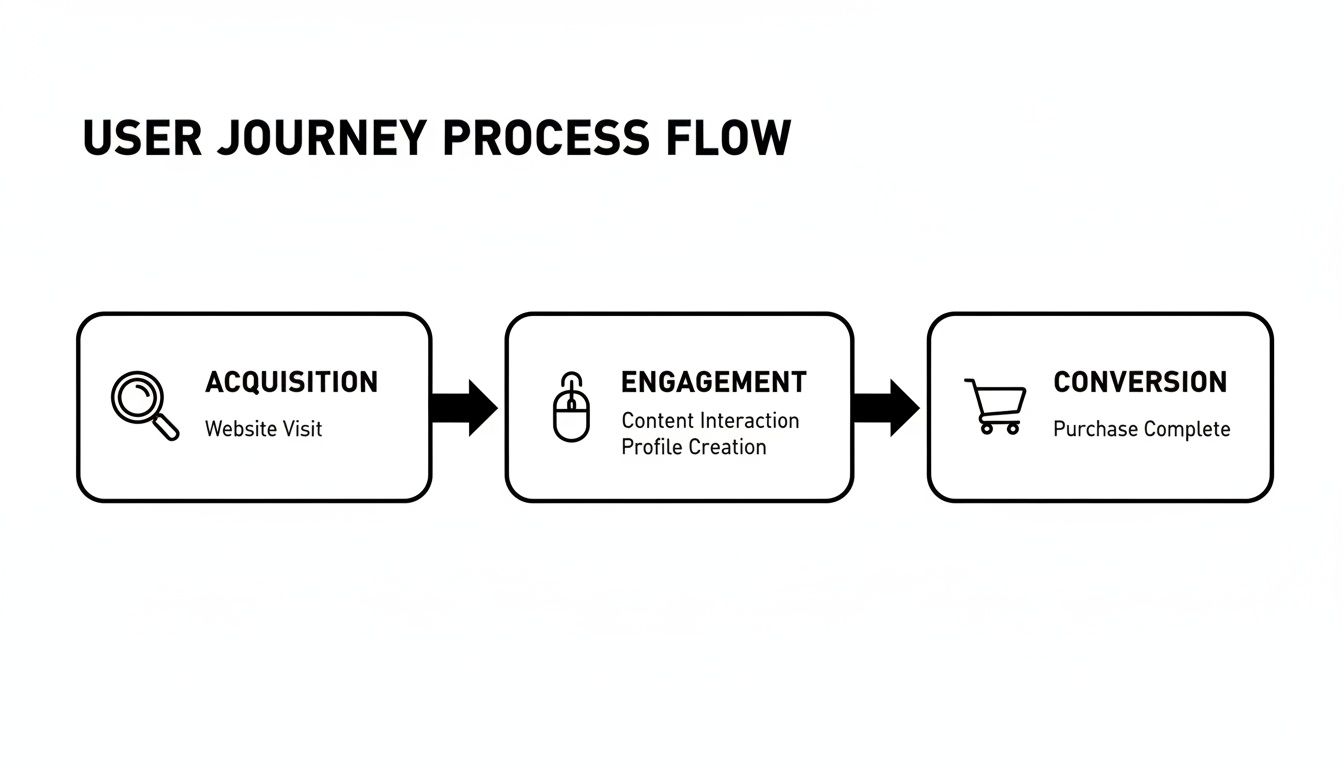
When you prioritize fixes that smooth out the path between acquisition and conversion, you're making a direct impact on your bottom line. It’s that simple.
Structuring Your 30-60-90 Day Plan
Once you've sorted your tasks, the next step is to build them into a realistic timeline. A 30-60-90 day plan is perfect for this because it breaks the action items into manageable chunks. It makes the entire process feel achievable and helps build momentum.
- First 30 Days: Go all-in on your "Quick Wins." This builds confidence and delivers immediate, measurable results that prove the value of the audit right from the start.
- Next 60 Days: Start scoping and planning one or two of your "Major Projects" while chipping away at the "Fill-in Tasks" in the background.
- Final 90 Days: Begin executing on the major projects you’ve planned. By this point, the initial quick wins should already be creating a positive impact on your performance.
The pressure to operate efficiently is real. Industry forecasts show that 52% of marketing leaders anticipate tighter budgets, and 51% expect to work with smaller teams. In this environment, accountability is everything. A prioritized audit plan is essential for proving the value of every single marketing dollar. You can read more about the volatile marketing landscape and why audits are critical.
Deciding When to Call for Backup
Finally, you have to be honest about who is going to execute this plan. Your in-house team can likely handle a lot of the content and on-page SEO tasks. But for the really complex challenges, bringing in an expert isn't just a cost—it's an investment in getting it done right the first time.
Consider partnering with an agency or a specialist for things like:
- Complex Technical SEO: Issues like site speed optimization, advanced schema markup, or resolving tricky crawlability errors often require deep, specialized expertise.
- Advanced Analytics Implementation: Setting up sophisticated tracking for e-commerce funnels or multi-touch lead generation can be a minefield if you don't live and breathe it every day.
- Competitive Strategy: Sometimes, an outside perspective is exactly what you need to spot opportunities your team is too close to see.
The right agency can accelerate your results and free up your team to focus on their core strengths. This kind of strategic partnership is often the final piece of the puzzle in turning your digital marketing audit into sustainable, long-term growth.
Common Questions About Digital Marketing Audits
Once you start digging into your analytics, paid ads, and SEO, questions are bound to surface. It's completely normal. Running your first full-scale digital marketing audit can feel like you're untangling a massive knot.
Let's clear up some of the most common queries. The goal here is to give you clear, direct answers so you can turn all those audit findings into confident, decisive action.
How Often Should I Run an Audit?
For the big, comprehensive audit—the one that covers everything from top to bottom—you should have that on the calendar annually. This gives you a high-level, strategic view to make sure your long-term efforts are actually pushing you toward your business goals.
But let's be real, the digital world moves way too fast for a once-a-year check-in. That’s why it’s smart to run smaller, more focused audits on a quarterly basis. These are perfect for keeping tabs on fast-moving channels like paid advertising or just checking in on core SEO metrics.
Of course, if you see a sudden, scary drop in performance or you’ve just launched a new website, don't wait. An immediate audit is a must.
What Are the Biggest Red Flags to Look For?
Some metrics are like smoke signals—they're not the fire, but they're warning you there is one. When you're in the weeds of your audit, keep a close eye out for these common red flags:
- A high website bounce rate on important landing pages usually means there's a huge disconnect between what people expected and what they got.
- A sudden, sharp drop in organic traffic is often a symptom of a technical SEO problem or a recent Google algorithm update that didn't go in your favor.
- Consistently low Return on Ad Spend (ROAS) is a clear sign you're burning money on the wrong keywords, audiences, or ad creative.
- A ton of "404 not found" errors in your Google Search Console report is bad news for user experience and means you're wasting valuable link equity.
These issues are rarely isolated. More often than not, they point to deeper, systemic problems in your strategy or the technical foundation of your site.
The difference between an SEO audit and a full digital marketing audit is scope. An SEO audit is a deep dive specifically into your organic search presence—technical health, content, and backlinks. A full audit includes SEO but also scrutinizes every other channel: paid media, social, email, and the entire customer journey.
Can I Do This Myself or Should I Hire an Expert?
You can absolutely perform a solid, foundational audit yourself. Using the framework in this guide and free tools like Google Analytics and Google Search Console is a fantastic way to spot obvious problems and grab some low-hanging fruit. It gives you a clear, actionable to-do list you can get started on right away.
However, for the really thorny challenges, bringing in an experienced agency is a smart investment. Deep technical SEO issues, complex data analysis, or uncovering subtle competitive strategies—that's where specialized expertise really shines.
An expert can deliver a more thorough diagnosis and a much faster path to fixing the core issues that are holding back your growth. In the long run, that often saves you far more money than it costs.
Ready to stop guessing and start growing? Jackson Digital provides a free performance audit to uncover your biggest opportunities. Our team of experts will analyze your SEO, paid media, and overall strategy to build a clear roadmap for scaling your business. Get your free, no-obligation audit today.